Quick answer: A guard clocking system is a tool used to verify a security guard’s presence and movement at a work site. Modern systems use smartphones with GPS, NFC, or QR codes to log timestamps for both attendance (clock-in/out) and patrol checkpoints, replacing older physical pipe or probe devices.
I’ve seen it all. I once had a supervisor at a large warehouse site in Dubai who was an absolute master of deception. He had his guys figured out. He’d collect their old-school Deggy pipes, drive around the 200-acre site in his pickup truck, and clock all their points for them in 30 minutes. Then he would hand the pipes back. The client saw perfect patrol reports every single day, while half the guards were probably asleep in their portacabins. The client was happy, the guards were happy, the supervisor looked like a star. This is the reality of ghost patrols.
That single experience almost a decade ago is why I am so particular about the technology we use for guard verification today. The old “guard control systems” were easy to fool. Modern guard clocking apps on a smartphone change the game entirely by merging patrol verification with attendance. It’s not just about proving a guard walked a route. It’s about proving the *right* guard was at the right place at the right time, from the moment they start their shift to the moment they end it.
Running patrols on paper registers? See live checkpoint tracking in action. Check GuardPatrolling plans and pricing.
What a Modern Guard Clocking System Actually Does
Let’s be clear. When we talk about a “guard clocking system” in 2024, we are not talking about the old pipe systems. We are talking about software, usually a smartphone app, that does two jobs in one: attendance and patrol. It’s a single solution for verifying a guard is on site and doing their rounds.
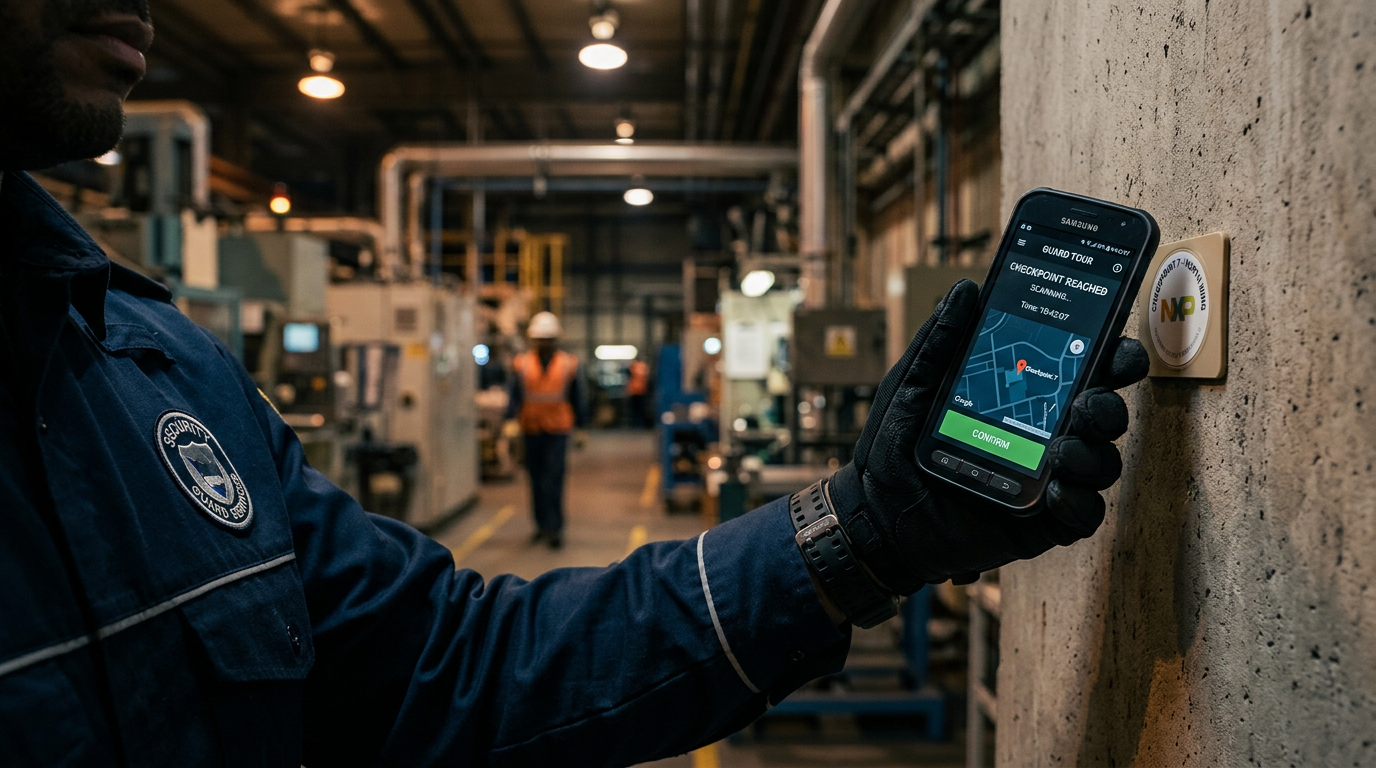
At its core, the system is built on checkpoints. These are physical tags, either NFC tags or QR codes, that you place at critical points around a site. The guard taps their phone on these tags to prove they were there. Each tap is a “clocking.”
But the real value comes from the data each clocking generates. It’s not just a timestamp. It’s a timestamp, a GPS location, the guard’s ID, and the checkpoint’s ID, all bundled together and sent to a live dashboard in real time. This is how you kill buddy punching.
Clock-In/Out vs. Patrol Clocking
This is a crucial distinction. A guard might clock *in* for their shift at the main gate using the app. This is their attendance verification. But then, every 30 or 60 minutes, they must perform a patrol, clocking checkpoints along their route. These are patrol clockings. A good system handles both seamlessly.
- Attendance Clocking: Typically done once at the start and end of a shift. It might use a single geofenced QR code at the site entrance. This tells you the guard is on the property.
- Patrol Clocking: Done repeatedly throughout the shift. This proves the guard is moving around the property and checking key areas like the perimeter fence, server room door, or fire pump house.
By using one app for both, you get a complete picture of the guard’s workday, all tied to one identity.
Key Facts About Modern Guard Clocking Systems
- Smartphone Based: The vast majority of modern systems are apps that run on standard Android or iOS smartphones, eliminating the need for expensive, proprietary hardware.
- Real-Time Data: Unlike old systems where data was downloaded at the end of a shift, new systems transmit data instantly. A missed checkpoint alert can be triggered in 60 seconds.
- GPS is Standard: Every clocking is typically stamped with a GPS coordinate. This is your first line of defense against a guard trying to clock a QR code by just taking a photo of it.
- NFC is More Secure: For high-security sites, Near Field Communication (NFC) is preferable. A guard must be physically within inches of an NFC tag to clock it, making it much harder to cheat than a QR code. We explore this in our QR code vs NFC guide.
- Beyond Clocking: These apps are full-fledged security guard apps that also include features for incident reporting, task management, and communication.
- Automated Accountability: Leading systems automate key verification and reporting tasks. Face Verification confirms the right guard is checking in via a quick selfie, while automatic Daily Email Reports send a full patrol summary to managers and clients, saving hours of admin work.
How We Stop Buddy Punching on Remote Sites
Buddy punching, where one guard clocks in for another, is the oldest problem in site management. On a remote construction site or a sprawling residential community, it’s rampant. I’ve had sites where we discovered three guards were covering five paid positions. A solid guard clocking system is your best weapon against this.
Here’s the strategy that works on my sites:
- Face Verification at Clock-In: The system uses Face Verification to confirm the guard’s identity. It forces the guard to take a live selfie, which is matched against their registered profile photo. Good apps use liveness detection to prevent someone from just holding up a photo of their buddy.
- Geofenced Perimeters: You define a virtual boundary (a geofence) around the site. The app will not allow a guard to clock in or out if their phone’s GPS shows they are outside this fence. I set my geofences tight, maybe 50 meters around the property line.
- Random Checkpoint Photos: For high-value patrol points, you can configure the system to demand a photo. For example, when clocking the “Diesel Generator” checkpoint, the app prompts the guard: “Take a photo of the fuel gauge.” This proves not just that they were there, but that they actually looked at the asset they were supposed to be checking.
- Combine NFC with GPS: The ultimate checkmate. The clocking must have a valid NFC tap *and* a GPS coordinate that falls within the geofence. The supervisor in my Dubai story couldn’t have beaten this. He could have driven to each point, but he couldn’t have been the one tapping the tag, as the system would be tied to the assigned guard’s specific phone and login.
Old vs. New: Comparing Guard Clocking Devices
For security managers who started their careers with the old hardware, the shift can be confusing. I get a lot of questions about this. Let’s break down the practical differences in a table.
| Feature | Old “Pipe” or “Probe” System | Modern Smartphone App System |
|---|---|---|
| Device | Proprietary, ruggedized wand or pipe. Expensive to replace (I’ve paid $400 for a single reader). | Standard, low-cost Android smartphone. Easy and cheap to replace. |
| Data Transfer | Batched. Guard brings device to a docking station to download data at end of shift. | Real-time. Data is sent to the cloud instantly over mobile data or Wi-Fi. |
| Location Verification | None. Only proves the wand was at the checkpoint, not where the checkpoint was. | GPS location recorded with every single clocking. |
| Guard Identity | Tied to the physical device. Anyone holding the device can perform the patrol. | Tied to a unique app login with optional Face Verification. |
| Alerts | No real-time alerts. You only find out about missed patrols hours later. | Instant alerts for missed checkpoints, panic button presses, or deviations. |
| Extra Features | None. Only records timestamps from checkpoints. | Includes live security guard tracking, incident reports with photos, task management, and more. |
Implementation: How to Deploy a Guard Clocking System
Deploying a system across a portfolio of properties takes planning. It’s not just about buying software. I’ve done this for hospitals, factories, and apartment complexes. Here’s my no-nonsense process.
Step 1: The Site Survey
Walk the site with the client or site manager. Identify the critical points. Don’t just place checkpoints randomly. Think about the patrol route. What are the most vulnerable areas? Where have incidents happened before? The perimeter, entry/exit points, server rooms, utility areas, and high-value storage zones are your primary candidates.
Step 2: Choosing Your Checkpoint Technology (NFC vs. QR)
For most indoor and corporate environments, QR codes work just fine. They are cheap and you can print them yourself. For outdoor, industrial, or high-security sites (think chemical plants or data centers), I strongly recommend investing in weatherproof NFC tags. NFC is more reliable and far more secure against tampering. An NFC tag costs about a dollar, a small price for robust security.
Step 3: Setting Up the Software
This is the admin work. You need to:
- Create the Site: Add the site name, address, and draw the geofence on the map.
- Add Checkpoints: Give each checkpoint a name (e.g., “North Perimeter Fence – Corner 3”) and assign its unique QR or NFC code.
- Define Patrols: Create scheduled patrols (e.g., “Nightly Patrol”) that specify which checkpoints must be scanned and in what time window.
- Onboard Guards: Create profiles for each guard with their photo, name, and contact details. Assign them a login and password for the app.
Step 4: Training ka Time
This is where many systems fail. Do not just hand the phone to the guard and expect them to figure it out. I budget 90 minutes for a training session with a group of guards. First, I explain *why* we are using the system, that it’s for their safety and for proving their good work. Then, I have each guard practice clocking in, scanning a few test checkpoints, and clocking out. On a live site, I do the first patrol *with* the guard to ensure they understand the route and the app.
Cost Considerations: What to Expect
The cost of a modern guard tour system has moved from a heavy one-time hardware expense to a monthly subscription fee. This is Software-as-a-Service (SaaS). Your cost will depend on the number of guards or sites you are managing.
Typically, pricing is per guard, per month. For a small team, you might pay $10-$15 per guard per month. For a large enterprise with hundreds of guards, that per-guard cost can drop significantly. There is usually no extra cost for checkpoints or the number of patrols you run.
Be wary of hidden costs. Ask the vendor directly: Is there a setup fee? Is training included? Do I have to pay extra for SMS alerts? A transparent provider will have all this laid out on their website. Check out our own guide to patrol system pricing for a deeper dive.
Frequently asked questions
What is the purpose of a guard clocking system?
The primary purpose of a guard clocking system is to provide verifiable proof that a security guard has completed their assigned patrols. It records the time, date, and location of a guard visiting specific checkpoints on their route. This ensures accountability, deters guard negligence, and provides clients with concrete evidence of security activities.
How do you clock a security guard?
With modern systems, a security guard is clocked using a smartphone app. They tap their phone on a designated NFC tag or scan a QR code at a checkpoint. This action instantly records their presence and location. For attendance, they may use the same app to perform a “clock-in” and “clock-out” action, often verified with Face Verification and GPS geofencing.
What is a DG V8 guard patrol system?
The DG V8 is an example of an older generation of guard clocking devices, often called a pipe or probe system. It’s a rugged, handheld electronic wand that a guard touches to physical iButton checkpoints along their route. The data is stored on the device and downloaded to a computer via a USB cable at the end of the shift for analysis.
How can I track my security guards?
You can track security guards using a smartphone app that includes a GPS tracking feature. A modern guard clocking system provides live location data, showing the guard’s current position on a map. It also records a breadcrumb trail of their movements during their patrol, which is more effective than just seeing a static location.
What is the difference between a guard clocking device and a guard tour system?
A “guard clocking device” refers to the specific hardware used to record a checkpoint visit, like a smartphone or an old pipe reader. A “guard tour system” is the complete solution, including the clocking device, the checkpoint tags (NFC/QR), the cloud software, the reporting dashboard, and the mobile app. The device is just one component of the overall system.
Can a guard clocking system work without an internet connection?
A live guard clocking system requires an internet connection (via mobile data or Wi-Fi) to function. This is a critical feature, not a limitation. The connection allows every scan, incident report, and GPS location to be uploaded instantly to the cloud. This means supervisors see events in real-time and can respond immediately. Systems that store data offline and sync later reintroduce the same delays and vulnerabilities of old hardware, where you only discover a problem hours after it happened.
Bottom line
A guard clocking system is no longer just a tool for verifying patrols. It is your central platform for guard management, attendance, and accountability. It’s how you prove your value to your clients and how you ensure your team is active and safe on site. The days of being fooled by a clever supervisor with a pickup truck are over, but only if you embrace the right technology.
Ready to move beyond paper logs and easily-fooled hardware? A modern app combines clocking, patrols, and reporting in one simple interface. See for yourself with a 15-day free demo — 1 guard, 1 site. No card required. Bring real accountability to your sites today.


